
Xbox Accessories Review: Living With the Xbox Wireless Controller

Some mornings, before the Texas heat really settles in, I’ll make a cup of coffee and read a few chapters before the day gets noisy. Gaming fits into my life the same way—quietly, in the margins. It’s not about chasing the newest thing. It’s about whether something feels good to use after the novelty wears off.
Product overview
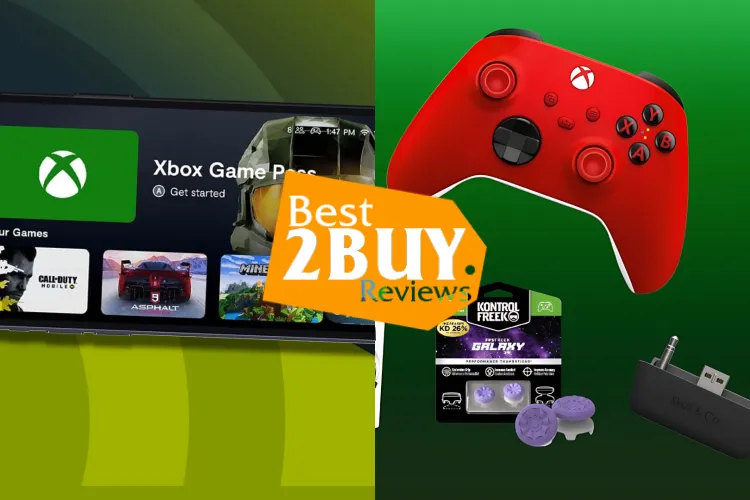
The Xbox Wireless Controller is one of the most common Xbox Accessories people end up owning, whether they planned to or not. It’s the primary way most of us interact with an Xbox Series X or Series S, and it also pulls double duty with Windows PCs, tablets, and even phones.
At its core, it solves a simple everyday problem: giving you a comfortable, reliable way to play for hours without thinking about the hardware in your hands. People care because controllers aren’t something you replace lightly. When they work well, you forget about them. When they don’t, every session feels a little off.
According to Microsoft’s official specifications, the current version includes textured grips, a hybrid D-pad, Bluetooth support, and USB-C charging compatibility, which brings it more in line with modern expectations.
Pros and cons
Pros
-
Comfortable shape that suits most adult hands
-
Solid button feedback without feeling stiff
-
Works across Xbox consoles, Windows PCs, and mobile devices
-
Widely available and easy to replace
-
Good battery life with AA batteries or rechargeable packs
Cons
-
Still sold without a built-in rechargeable battery
-
Textured grips can wear smooth over time
-
Not ideal for very small hands
-
Premium colors cost more without adding functionality
Real-world performance and quality
Day to day, this controller does what it’s supposed to do. The thumbsticks feel precise enough for shooters, and the triggers have a smooth resistance that doesn’t fatigue your fingers. After longer sessions—two or three hours in—the controller doesn’t dig into the palms or cause soreness, which matters more than flashy features.
Build quality is mostly dependable. Buttons hold up well, but long-term users do report occasional stick drift, something Consumer Reports has noted as a broader issue across modern controllers, not just Microsoft’s. In my experience, it’s not common, but it’s not unheard of either.
Battery life depends on how you power it. With standard AA batteries, you’ll usually get a few weeks of casual play. Rechargeable packs are more convenient, but they’re an added cost.
Who it’s for
This controller makes sense for:
-
Players who want a familiar, no-learning-curve experience
-
Households with multiple Xbox consoles or PCs
-
Adults who value comfort over extra buttons and customization
-
Anyone building a practical collection of Xbox Accessories over time
It’s especially well-suited for people who play a mix of genres and don’t want to switch controllers depending on the game.
Who should avoid it
You may want to skip this if:
-
You strongly prefer built-in rechargeable batteries
-
You have smaller hands and find standard controllers bulky
-
You want advanced customization like back paddles
In those cases, alternatives like the Xbox Elite Series 2 or certain third-party controllers offer more flexibility, though usually at a higher price and with added complexity.
Why consider buying
What this controller offers is consistency. It’s not exciting, but it’s dependable. Over months of use, that matters. Buttons don’t loosen quickly, the connection stays stable, and it works across devices without much fuss.
For many people, it’s a sensible long-term purchase rather than something you’ll replace every year. At the end of the day, that kind of reliability is worth more than extra features you may never use.
Where to buy for better value
Amazon, Walmart, and Microsoft’s official store all carry this controller. Prices tend to be similar, though Amazon often has color variants discounted.
On Best2Buy.reviews, readers can click product links that redirect to Amazon for fast, secure checkout. It’s convenient, especially if you’re already ordering other things, but it’s not always the cheapest option. Walmart occasionally undercuts pricing during seasonal sales.
If the controller is only a few dollars off, it’s honestly fine to wait. It’s not worth buying just because it’s slightly discounted if you don’t need it yet.
Frequently asked questions (FAQ)
Does the Xbox Wireless Controller work on PC?
Yes. It connects via Bluetooth or USB-C to Windows PCs and is supported by most modern games.
Are rechargeable batteries included?
No. It ships with AA batteries. Rechargeable packs are sold separately.
How long does the controller last?
With normal use and care, many users report several years of reliable performance, though wear can vary.
Is it safe for kids to use?
From a hardware standpoint, yes. Microsoft designs it to meet standard consumer safety requirements. Parental controls are handled through the console, not the controller itself.
Quick verdict
A comfortable, reliable controller that fades into the background—in a good way. Not flashy, but dependable enough for everyday play.
Final thoughts
I’ve learned over the years that the things we use most should ask the least from us. This controller fits that idea. It doesn’t try to impress. It just works, quietly, session after session.